
How Fake Microsoft 365 Login Pages Lead to Cloud Account Takeovers
Introduction
Microsoft 365 has become one of the most targeted cloud platforms because it provides a single identity that grants access to email, collaboration tools, cloud storage, and enterprise applications. Rather than exploiting Microsoft 365 itself, attackers exploit the trust users place in its authentication process.
Today’s phishing campaigns are no longer simple HTML login pages hosted on suspicious domains. Modern phishing kits leverage reverse proxy frameworks, session hijacking, and cloud-hosted infrastructure to steal authenticated sessions, bypass traditional email defenses, and gain persistent access to enterprise tenants.
The result is often a complete cloud account takeover without deploying a single piece of malware.
Initial Access: Delivering the Phishing Link
The attack typically begins with a carefully crafted phishing email delivered through:
- Business Email Compromise (BEC)
- Compromised Microsoft 365 tenants
- QR-code phishing (Quishing)
- Trusted cloud storage links
- URL shortening services
- Third-party collaboration platforms
Instead of attaching malware, the email contains a URL directing the victim to a phishing infrastructure that closely mimics Microsoft’s authentication workflow.
Attackers frequently register lookalike domains using techniques such as:
micr0soft-login[.]commicrosoft-auth365[.]comoffice365-security[.]comlogin-microsoftonline[.]com
Many campaigns also abuse legitimate services such as Azure Static Web Apps, GitHub Pages, Cloudflare Pages, Firebase Hosting, or compromised WordPress websites to host phishing content, making reputation-based blocking significantly more difficult.
Reverse Proxy Phishing: Why Traditional MFA Isn't Always Enough
One of the biggest advancements in phishing is the use of Adversary-in-the-Middle (AiTM) frameworks such as Evilginx2, Modlishka, and Muraena.
Unlike traditional phishing pages that simply collect usernames and passwords, these frameworks operate as reverse proxies between the victim and Microsoft’s legitimate authentication service.
The authentication flow typically follows this sequence:
Victim │ ▼Phishing Domain(AiTM Reverse Proxy) │ ▼login.microsoftonline.com
The victim unknowingly authenticates against the real Microsoft login service through the attacker’s proxy.
The proxy captures:
- Username
- Password
- MFA verification
- Authentication cookies
- Session tokens
- OAuth authorization responses
Since Microsoft successfully validates the user, the attacker receives the same authenticated session as the victim.
No password cracking is required.
Session Cookie Theft Enables Account Takeover
Microsoft 365 uses authentication cookies and OAuth tokens to maintain authenticated sessions.
Attackers target cookies such as:
- ESTSAUTH
- ESTSAUTHPERSISTENT
- x-ms-gateway-slice
- x-ms-cpim cookies
- Primary Refresh Token (PRT) in advanced compromises
Once stolen, these cookies can often be replayed to access Microsoft 365 without requesting the user’s password again.
From Microsoft’s perspective, the attacker is simply continuing an already authenticated session.
This technique effectively bypasses traditional MFA because MFA validation has already occurred.
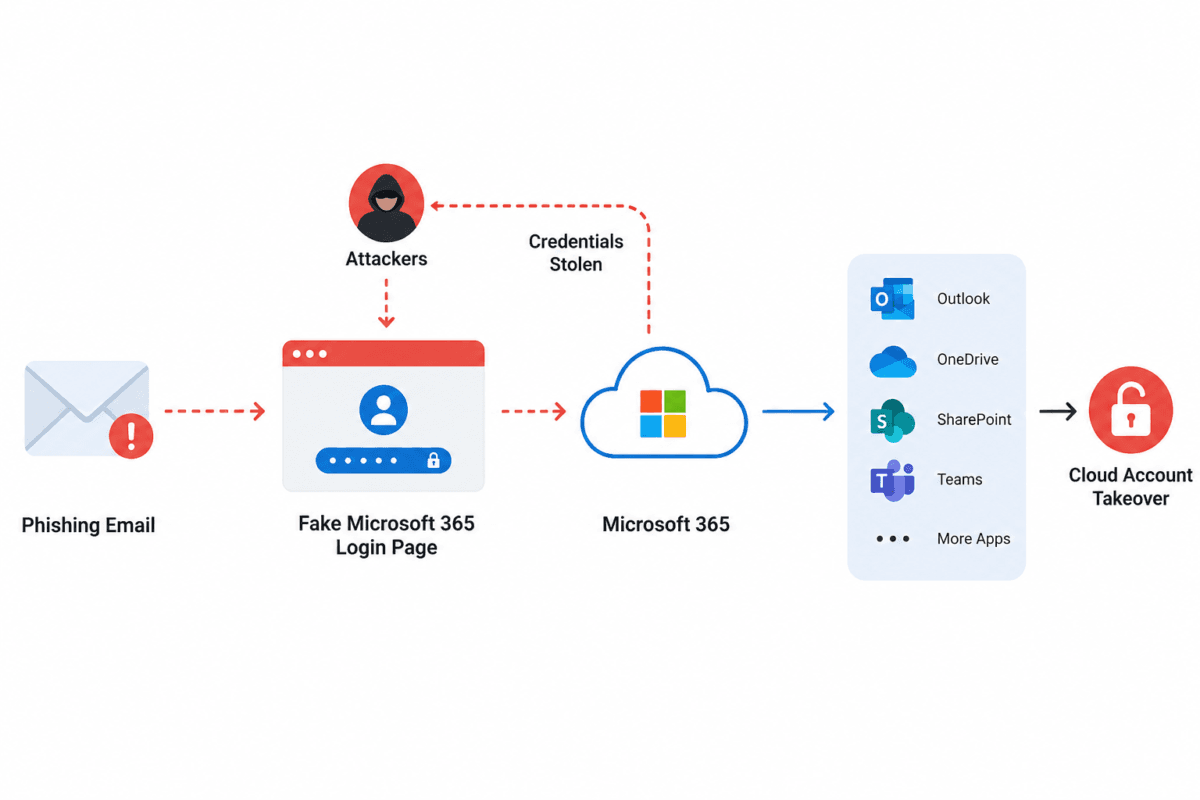
Post-Compromise Activities
Once authenticated, attackers begin reconnaissance before taking disruptive actions.
Common objectives include:
Exchange Online
- Reading executive emails
- Searching for invoices
- Identifying payment workflows
- Creating inbox forwarding rules
- Deleting security notifications
SharePoint Online
- Enumerating document libraries
- Downloading confidential files
- Searching for financial records
- Collecting customer information
OneDrive
- Mass downloading corporate documents
- Identifying intellectual property
- Accessing engineering documentation
Microsoft Teams
- Reading internal conversations
- Harvesting project information
- Collecting authentication links
- Identifying privileged users
Entra ID (Azure AD)
- Enumerating users
- Identifying Global Administrators
- Discovering Conditional Access Policies
Mapping tenant configuration
OAuth Abuse Without Password Theft
Not every Microsoft 365 phishing campaign steals passwords.
Many attacks request users to grant permissions to a malicious OAuth application.
The victim receives a legitimate Microsoft consent screen requesting permissions such as:
Read MailRead FilesAccess User ProfileMaintain Offline Access
Once approved, attackers receive OAuth refresh tokens that provide long-term access without ever knowing the user’s password.
Because authentication occurs through Microsoft’s own infrastructure, these attacks are difficult for users to distinguish from legitimate application requests.
Persistence Techniques
After initial access, attackers frequently establish persistence by:
- Creating mailbox forwarding rules
- Registering malicious enterprise applications
- Adding secondary authentication methods
- Creating hidden inbox folders
- Modifying Conditional Access exclusions
- Registering new devices
- Generating long-lived OAuth refresh tokens
Persistence allows attackers to regain access even after passwords are changed if remediation is incomplete.
Detecting a Cloud Account Takeover
Security teams should continuously monitor Microsoft 365 telemetry for indicators such as:
- Impossible travel events
- Anonymous proxy logins
- TOR exit node authentication
- New device registrations
- Token replay activity
- Legacy authentication attempts
- OAuth consent grants
- Suspicious mailbox rules
- Mass SharePoint downloads
- Large OneDrive synchronizations
- Abnormal Graph API usage
Microsoft Defender XDR, Microsoft Sentinel, and Entra ID Identity Protection can significantly improve visibility into these activities when properly configured.
Why Email Security Alone Cannot Stop These Attacks
Secure Email Gateways (SEGs) primarily analyze:
- Sender reputation
- Domain reputation
- Attachments
- Known malicious URLs
Modern phishing campaigns evade these controls by:
- Using newly registered domains
- Hosting phishing pages on trusted cloud providers
- Delivering URLs only after CAPTCHA validation
- Dynamically generating phishing pages
- Redirecting users through multiple URL chains
- Cloaking phishing content from automated scanners
As a result, some phishing emails inevitably reach employee inboxes.
Adding a Phishing Link Checker to the Defense Strategy
Once a phishing email reaches a user, the final line of defense is preventing interaction with the malicious URL.
A phishing link checker analyzes links in real time using multiple intelligence sources, including:
- URL reputation analysis
- Domain age and WHOIS indicators
- SSL certificate validation
- Redirect chain inspection
- Lookalike domain detection
- Hosting infrastructure analysis
- Brand impersonation detection
- Threat intelligence correlation
Rather than relying solely on static blocklists, modern phishing link checkers evaluate the risk of a URL before users enter credentials, helping identify newly created phishing sites that may not yet appear in traditional reputation databases.
When integrated with user awareness initiatives, email security, and cloud identity protections, this additional layer significantly reduces the likelihood of credential theft and cloud account compromise.
A Layered Defense Against Microsoft 365 Phishing
Protecting Microsoft 365 identities requires multiple complementary controls:
- Microsoft Defender for Office 365
- Microsoft Entra ID Conditional Access
- Multi-Factor Authentication (MFA)
- Passkeys or FIDO2 security keys for phishing-resistant authentication
- Microsoft Defender XDR
- Microsoft Sentinel SIEM
- OAuth application governance
- Continuous identity monitoring
- Security awareness training
- Real-time phishing link checker technology
No single security solution can eliminate phishing-based attacks. Combining identity protection, continuous monitoring, and proactive URL verification creates a far more resilient defense against modern cloud account takeover techniques.
Final Thoughts
Modern Microsoft 365 compromises rarely rely on software vulnerabilities—they exploit trusted authentication workflows. Reverse proxy phishing frameworks, OAuth abuse, and session token theft allow attackers to bypass conventional defenses and operate with legitimate user identities.
Organizations that focus only on email filtering and MFA leave a critical gap in their security posture. Incorporating a phishing link checker into the security stack helps identify deceptive URLs before users authenticate, reducing the risk of credential theft, session hijacking, and cloud account takeovers.
Protect your Microsoft 365 environment before a single click becomes a cloud compromise. SecuriGlobe’s intelligent phishing link checker helps users detect fraudulent Microsoft 365 login pages and suspicious URLs in real time, complementing cloud security controls and strengthening enterprise identity protection.